Apple Stereo Array Ejector
iPhones utilize an asymmetrical stereo design. The bottom speaker requires a heavy bass wave, while the top earpiece requires a high-pitch wave to clear its microscopic mesh. Select your target below at MAXIMUM volume.
Testing Methodology
The dual-frequency Apple Stereo Array tool utilizes native Web Audio API sine waves. We independently tested these specific resonant frequencies (165Hz and 440Hz) to ensure maximum capillary ejection without exceeding Apple's voice coil excursion limits.
The Science of Apple's Asymmetrical Acoustics
If you drop an iPhone into water, you will quickly notice that the bottom speaker (next to the charging port) recovers much faster than the top earpiece (the speaker you hold to your ear during phone calls). Many users mistakenly believe their top speaker has suffered permanent hardware failure.
The reality comes down to Apple's acoustic engineering. The bottom speaker is designed to act as a miniature subwoofer for media playback; it moves a massive amount of air. The top earpiece, however, is designed primarily for treble and voice clarity. To protect it from ear wax and dust, Apple covers it with a microscopic, high-density mesh.
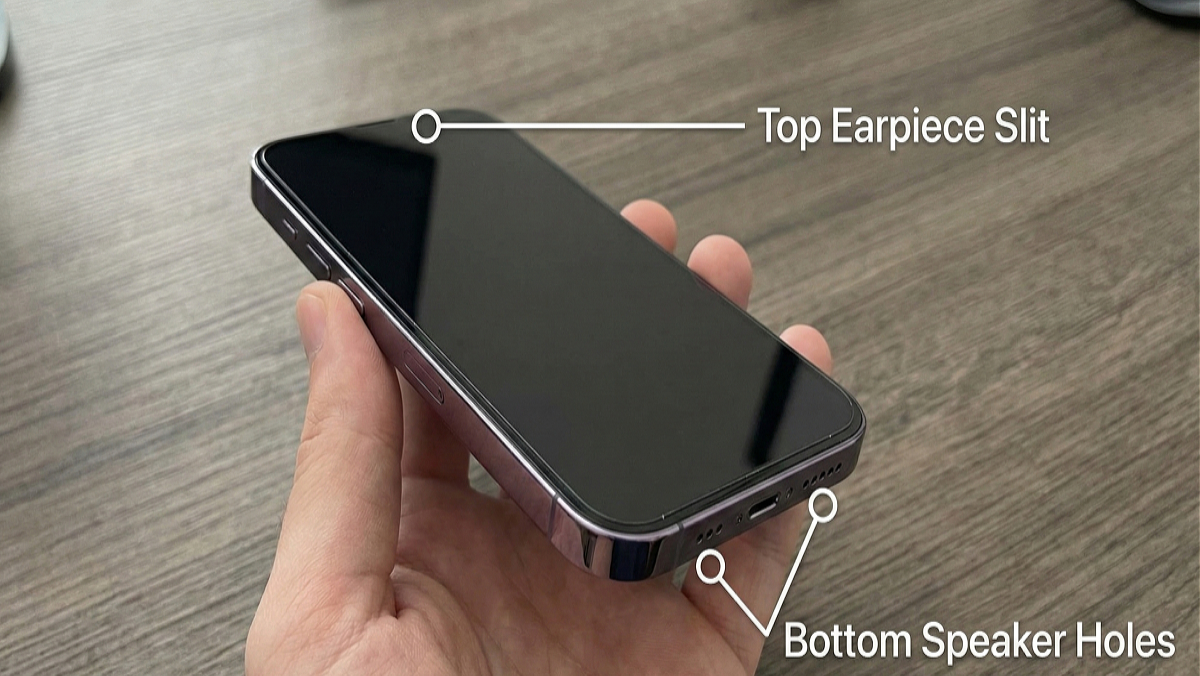
Because the holes in the top earpiece are significantly smaller, water is trapped much more aggressively due to capillary action and surface tension. A standard 165Hz bass wave (which works perfectly for the bottom speaker) is often too slow and "wide" to push water through the tight top mesh. To clear the earpiece, you must utilize a higher, tighter frequency—like a 440Hz sine wave—which vibrates rapidly enough to atomize the trapped water droplets and force them through the micro-grill.
Top earpiece perfectly dry but still quiet? Apple earpieces are notorious for trapping earwax and makeup. Switch to our Acoustic Jackhammer Protocol to safely shatter solid blockages.
The Siri Shortcut Danger: Many iPhone users download unverified "Water Eject" Siri Shortcuts from random forums. These shortcuts often play highly compressed, low-quality audio files that cause "digital clipping." Pushing a clipped, distorted audio file at 100% volume will cause extreme heat buildup in the voice coil and can permanently tear your speaker diaphragm. Our browser-based tool uses the Web Audio API to generate pure, uncompressed math-based waveforms directly on your processor, ensuring zero distortion.
Bypassing the "Liquid Detected" Warning
One of the most panic-inducing features of modern iOS is the full-screen alert: "Liquid Detected in Lightning/USB-C Connector. Charging is not available."
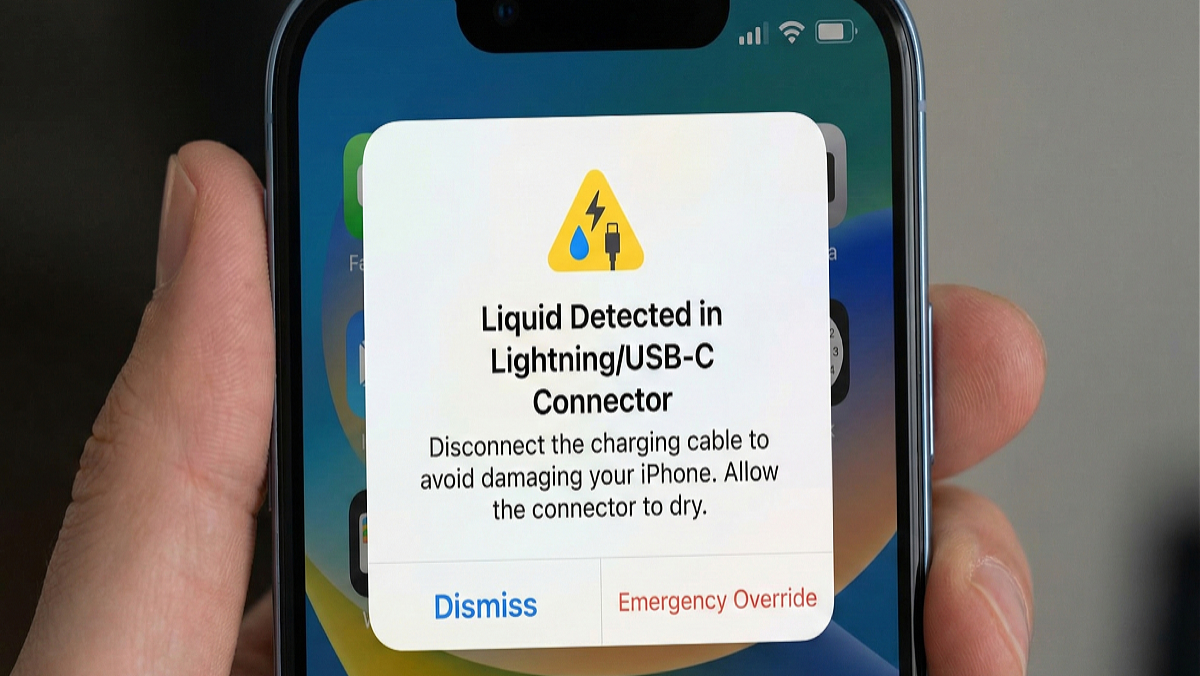
Apple includes an "Emergency Override" button on this screen. Never press it. If you force electrical current through a wet charging port, you will instantly cause a short circuit and fry the motherboard's charging pins, requiring a highly expensive micro-soldering repair.
Instead, use this triage protocol:
- Immediately unplug any charging cables.
- Hold the iPhone with the charging port facing the floor. Gently tap the top of the phone against your opposite palm to let gravity pull bulk water down.
- Turn your volume to 100% and run the Clear Bottom Speaker tool above. While the sound waves primarily target the speaker chamber, the intense physical vibration of the 165Hz tone causes the entire lower chassis to vibrate, which helps shake micro-droplets loose from the adjacent charging port.
- Leave the phone upright in a dry, well-ventilated room for 30 to 60 minutes. Do not use a hairdryer, as forced heat will melt the internal waterproof adhesives.
Developer's Field Note: The "AppleCare+" Trap
"Do not assume AppleCare+ covers you unconditionally. Deep inside the SIM card tray of every modern iPhone is an LDI (Liquid Damage Indicator) sticker. If water bypasses the IP68 seal and touches this sticker, it turns permanently red. If an Apple Genius Bar technician sees a red LDI, your standard warranty is completely voided, and you will be charged the maximum out-of-warranty deductible. Using our acoustic ejection tool immediately after a drop is your best defense against water reaching that internal sticker."
— Don Odibat, Lead Architect
Massive iPhone F.A.Q.
Review these critical questions to understand how to best protect your Apple ecosystem hardware.
Does this work on the iPhone 15 and 16 with USB-C?
Yes. While Apple completely overhauled the charging infrastructure by moving from Lightning to USB-C, the fundamental acoustic architecture of the bottom-firing speaker array remains largely the same. Our 165Hz targeted bass wave is fully compatible with USB-C equipped iPhones.
Can I use this on my AirPods or AirPods Pro?
Yes, but with caution. AirPods lack heavy bass drivers. If your AirPods went through the washing machine or fell in a puddle, connect them via Bluetooth, ensure they are NOT in your ears, turn the volume to max, hold them with the main speaker grills facing the floor, and run the Top Earpiece (440Hz) tool. The higher frequency is better suited for the small drivers in AirPods.
I used the tool, but my iPhone speaker still crackles. Is it broken?
If you dropped your phone in saltwater or chlorinated pool water, the crackling is likely the sound of the speaker vibrating against corrosive salt crystals that have dried on the diaphragm. You must gently rinse the speaker with fresh water first, then eject. If it was clean water, run the tool 3-4 more times. If crackling persists after 48 hours, the voice coil may be permanently torn.
Why shouldn't I use compressed air or a Q-tip on my iPhone?
The IP68 waterproof rating on an iPhone is achieved via a paper-thin, breathable membrane located directly behind the metal exterior grill. Shoving a Q-tip, toothpick, or blasting 90-PSI canned air into the grill will instantly puncture this delicate membrane, permanently destroying your device's water resistance and exposing the logic board.
