If you have ever dropped your smartphone in a puddle, a sink, or exposed it to a heavy rainstorm, you know how crucial it is to extract that moisture fast.
Testing Methodology
The acoustic frequencies and cleaning protocols outlined in this foundational guide have been actively bench-tested by Don Systems across hundreds of hardware iterations to ensure maximum safety for IP68-rated membranes and delicate voice coils.
The Anatomy of Audio Degradation
To understand why you need a speaker cleaner, you must understand the environment your phone lives in. The bottom edge of your smartphone, where the primary speaker is usually located, is constantly exposed to hostile elements.
The Magnetic Magnetism Trap
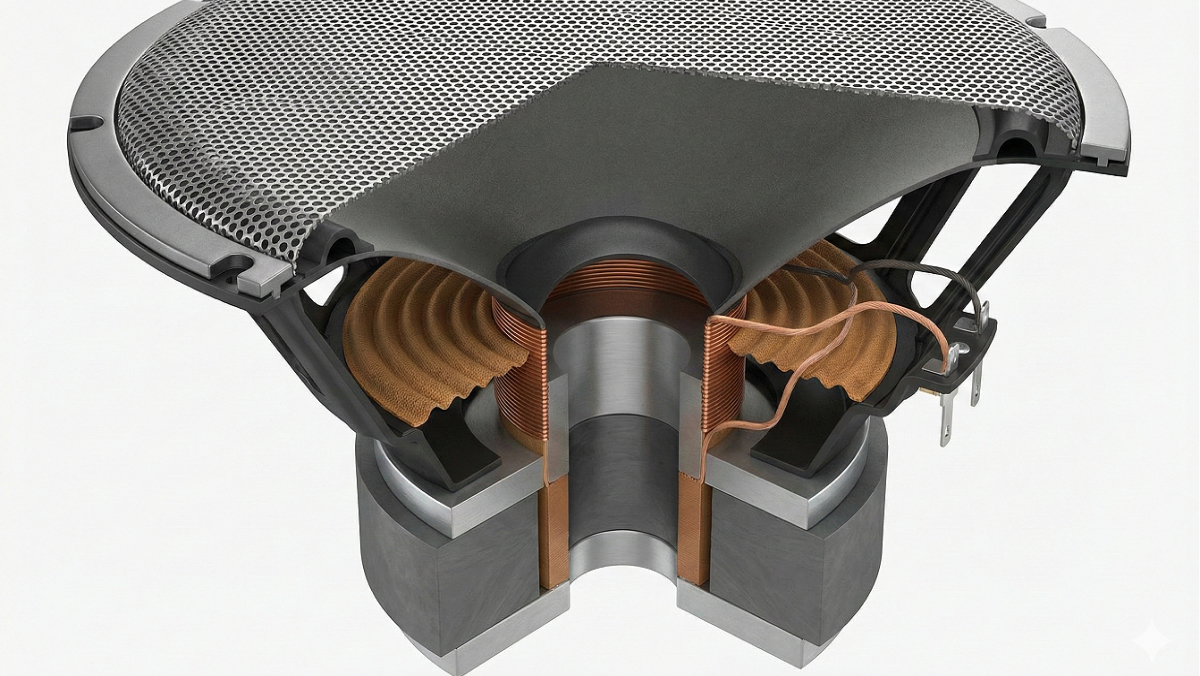
Inside your phone's speaker is a voice coil. To produce sound, this coil generates a rapidly shifting electromagnetic field. While this is great for moving the speaker diaphragm, it creates an unintended side effect: your speaker is a literal magnet. Every time you set your phone down on a dusty table, near a workbench, or even in a cup holder, microscopic metallic dust particles are actively pulled into the speaker grill.
The Creation of "Audio Crust"
Metal dust is only part of the problem. When you put your phone in your pocket, you introduce fabric lint. When you hold your phone to your face to take a call, you introduce natural skin oils, makeup, and sweat. When these elements—metal dust, lint, and oils—mix together inside the microscopic holes of your speaker mesh, they form a substance technicians refer to as audio crust.
This crust hardens over time. It forms a physical barrier that traps acoustic energy inside the phone chassis. The speaker is still producing the same volume of sound, but it is effectively trapped behind a wall of dirt. This is exactly why your phone sounds 40% quieter after a year of use.
Dealing with severe lint buildup? If your speaker is bone dry but completely blocked, switch to our targeted Acoustic Jackhammer Protocol.
Hardware vs. Software Speaker Cleaners
When faced with a dirty speaker, consumers generally turn to one of two solutions: physical hardware tools or digital software tools. Understanding the difference is crucial to protecting your device.
Developer's Field Note: The Danger of Physical Cleaning
"As a web developer who constantly works from cafes and co-working spaces around the world, I've seen countless digital nomads ruin their expensive smartphones by shoving toothpicks into their speaker grills to clear out beach sand or pocket lint. Puncturing that delicate IP68 waterproof membrane destroys the phone's defenses instantly. Realizing the lack of accessible, software-based maintenance tools that didn't hide behind a paywall, I coded Speaker Cleaner Pro. It uses your device's native Web Audio API to safely shake out debris without risking your hardware."
— Don Odibat, Lead Developer
The Danger of Physical Hardware Tools
The instinct for most people is to grab a physical tool to dig the dirt out. This is a massive mistake. The mesh protecting your speaker is incredibly delicate, and directly behind it sits the waterproof membrane that protects the motherboard.
- Toothpicks and Needles: Shoving a sharp object into the speaker holes will almost certainly puncture the waterproof membrane. Once this is punctured, a single drop of sweat or rain can instantly kill your device. Furthermore, needles often push the dirt deeper into the mesh rather than extracting it.
- Compressed Air: While great for keyboards, canned air is too forceful for smartphone speakers. A direct blast of 90 PSI compressed air will rupture the speaker cone, causing permanent physical distortion (crackling) that cannot be repaired without replacing the hardware.
- Cleaning Putty / Blu-Tack: While sometimes effective at grabbing surface lint, if the putty is pushed too hard, it will sheer off and get permanently lodged inside the tiny mesh holes, completely blocking the audio.
The Superiority of Digital Acoustic Cleaners
A digital Speaker Cleaner app or web utility is a non-invasive solution. Rather than inserting a foreign object into the phone, it uses the phone's own internal hardware to push the dirt out from the inside. By generating specific audio frequencies, the tool turns the speaker into a microscopic jackhammer and a high-powered fan.
Non-Invasive Safety: Because an acoustic cleaner relies purely on sound waves, there is zero risk of puncturing the waterproof seals, scratching the chassis, or pushing dirt deeper into the device.
How the Acoustic Speaker Cleaner Works
Not all sound is created equal. Playing heavy metal music at max volume will not clean your speaker because the sound waves are unpredictable and chaotic. A true Speaker Cleaner utilizes precise, mathematical waveforms to achieve physical results.
1. The Low-Frequency Square Wave (The Jackhammer)
When dealing with hardened dust and lint, the tool initiates a low-frequency Square Wave (typically around 60Hz to 100Hz). A normal sound wave (a sine wave) curves smoothly up and down. A square wave, however, snaps violently from maximum positive amplitude to maximum negative amplitude.
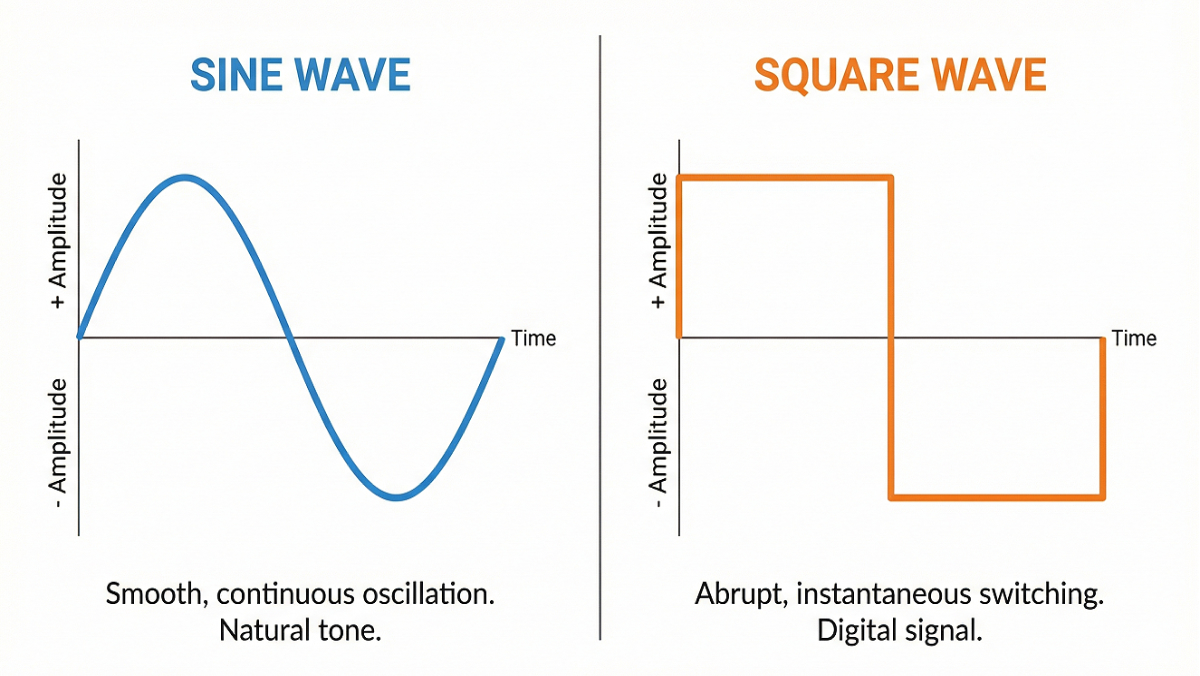
This creates a harsh, physical "clicking" or "buzzing" impact on the speaker cone. This physical jarring fractures the hardened audio crust, breaking the solid dirt into smaller, manageable particles.
2. The High-Frequency Sine Wave (The Blower)
Once the crust is fractured, the tool sweeps up into high-frequency Sine Waves (ranging from 500Hz up to 12kHz). These high-pitch tones create incredibly rapid, tight vibrations. This acts like an internal fan, blowing the fractured micro-dust outward through the mesh grill.
Is your phone currently wet? Smooth sine waves are essential for pushing liquid. Go directly to our Advanced Water Eject Tool to start the displacement sequence.
Step-by-Step: The Ultimate Cleaning Protocol
If your device audio is degraded, follow this protocol using our free web tool to safely restore it to factory conditions:
- Preparation: Power on your device and remove any cases that might obstruct the speaker grills. Ensure Bluetooth is disabled so the sound plays locally.
- Surface Wipe: Use a clean, dry microfiber cloth or a very soft, dry toothbrush to gently sweep across the speaker grill. Do not press inward. This removes loose surface debris.
- Volume Max: Use the hardware buttons to turn your media volume to 100%. The acoustic cleaner requires maximum power to generate the necessary air pressure.
- Positioning: Hold the phone so the speaker you are trying to clean is facing directly down toward the ground. Gravity will assist the sound waves in pulling the heavy dust particles out of the device.
- Initiate the Clean: Navigate to our tool and select the Dust-Shake Mode or run the automated Pro Mode. You will hear a series of harsh buzzing sounds followed by high-pitched ringing.
- Verify with Diagnostics: After the cycle is complete, use our built-in Left/Right and Bass/Treble diagnostic buttons to test the clarity of the speaker. Repeat the process if the sound remains slightly muffled.
Preventative Maintenance: Keeping Your Audio Clear
Why wait until your phone sounds terrible to clean it? The best way to maintain 100% audio fidelity is through preventative maintenance.
We highly recommend running a Speaker Cleaner cycle once every two to four weeks. By running the tool regularly, you constantly blow out the light dust and lint before it ever has a chance to mix with humidity and harden into a crust. Taking 30 seconds a month to run an acoustic cycle will ensure that your $1,000 smartphone always sounds like it just came out of the box.
